Focus follows your gaze
OkuShift automatically switches display focus to the screen you're looking at. No clicks, no keyboard shortcuts. Just look.
Requires macOS 15.3 (Sequoia) or later

OkuShift automatically switches display focus to the screen you're looking at. No clicks, no keyboard shortcuts. Just look.
Requires macOS 15.3 (Sequoia) or later
Stop reaching for your mouse just to click on another screen. OkuShift makes multi-monitor setups feel natural.
Advanced gaze tracking using your built-in webcam. No special hardware required.
All processing happens locally on your Mac. No video is recorded, stored, or transmitted anywhere.
Optimized for minimal latency. Focus switches in milliseconds after you look at a screen.
Quick calibration adapts to your unique setup, seating position, and display arrangement.
Works with 2 or more displays in horizontal arrangements. Look left, right, or center.
Intelligent dwell time and hysteresis prevent accidental switches when glancing around.
Get started in under a minute with a simple calibration process.
Download OkuShift and grant camera access and accessibility permissions when prompted.
Look at each of your screens when prompted. OkuShift learns your gaze patterns in seconds.
That's it! OkuShift runs quietly in your menu bar. Focus follows your gaze automatically.
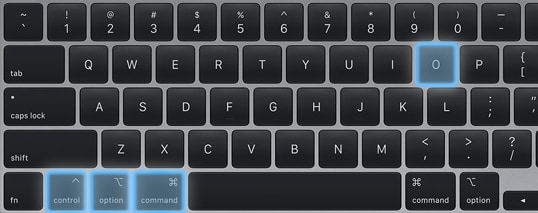
Gaming? Video call? Presentation? Toggle OkuShift on or off instantly—no menu diving required.
One-time purchase. No subscriptions. Free updates.
No spam—just your launch invite and discount code.
Have questions, feedback, or need support? We'd love to hear from you.